ThoughtSpot logo
Cloud
Software Mobile ThoughtSpot
Embedded
SeekWell

Cloud

    • About this release
      • Release notes
        • Monthly
        • Weekly
        • Release history
          • 2025
            • September
            • July
            • June
            • May
            • April
            • February
          • 2024
            • December
            • November
            • October
            • August
            • July
            • June
            • May
            • April
            • February
            • January
          • 2023
            • November
            • October
            • September
            • August
            • June
            • May
            • February
            • January
          • 2022
            • November
            • October
            • September
            • August
            • June
            • May
            • April
            • March
            • January
      • Deprecated and removed features
      • Cloud releases
      • Release life cycle
      • Accessibility
    • Getting started
      • Requirements
        • Web browser
      • Activate your account
      • User onboarding
        • Finding your way around
        • New home page and navigation
        • Your user profile
        • System language
        • Web notifications
        • Business user onboarding
          • Privileges
        • Analyst onboarding
    • Spotter
      • Using Spotter
        • Getting started
        • Capabilities of Spotter
          • Why questions in Spotter
          • How Spotter works in non-English languages
        • Spotter app in Slack
        • Spotter best practices
        • Troubleshooting
        • Limitations
      • Deploying Spotter
        • Preparing for Spotter
          • Spotter Model readiness
          • AI Context
        • Enabling Spotter
        • Connect to your Large Language Model (LLM)
        • Spotter Conversations Liveboard
        • Integrating Spotter in external apps
        • Spotter security
      • Coaching Spotter
        • Natural language instructions in Spotter
        • Creating reference questions
          • Adding context in Spotter
        • Defining business terms
        • Coaching levels and permissions
        • Coaching within a conversation
        • Coaching best practices
        • What to do after coaching Spotter
        • Import and export coaching TML
      • Frequently asked questions
    • Search
      • Search basics
      • Search Answers
      • Search Data
        • Choose a data source
      • Search bar features
      • Search suggestions
      • Search results and column types
      • Add a hyperlink to a search
      • Use keywords in search
      • Time series analysis
      • Search using growth over time
      • Using the keyword in for nested searches
      • Proximity search: near and farther than
      • Other search actions
        • Change result display options
        • Show underlying data
        • See the search behind a result
        • Apply conditional formatting
        • Download your search
      • Query and autocomplete options
      • Formulas
        • Add formula to search
        • View or edit formula in search
        • Semi-additive measures
          • Last_value and first_value functions
          • Last_value_in_period and first_value_in_period functions
        • Aggregate formulas
          • Cumulative functions
          • Moving functions
          • Flexible aggregation functions
          • Grouping functions
            • Reaggregation in practice
          • Keywords "of", "percentage of"
          • Filtered aggregation functions
          • Aggregate filters
          • Conversion functions
          • Date functions
          • Percent calculations
          • Formula operators
          • Nested formulas
          • Formulas for chasm traps
    • Liveboards
      • Liveboards
        • Liveboard experience
          • Collaborative Liveboards
        • Edit Liveboard layouts
        • Liveboard tabs
        • Liveboard filters
        • Personalized Liveboard views
        • Verified Liveboards
        • Answer Explorer
        • AI Highlights
        • Search actions within a Liveboard
        • Copy a Liveboard
        • Copy a Liveboard or visualization link
        • Reset a Liveboard visualization
        • Present Liveboard as slideshow
        • Download as PDF
    • Insights
      • Homepage
      • Answers
        • Work with Answers
          • Results that are tables
          • Date filters for Answers
          • Custom sort order
        • Charts
          • Chart types
            • Column charts
            • Stacked column charts
            • Line charts
            • KPI charts
            • Pivot table
            • Donut charts
            • Bar charts
            • Stacked bar charts
            • Line column charts
            • Area charts
            • Stacked area charts
            • Line stacked column charts
            • Scatter charts
            • Bubble charts
            • Waterfall charts
            • Heatmap charts
            • Treemap charts
            • Funnel charts
            • Geo charts
              • Geo bubble charts
              • Geo heatmap charts
              • Geo area charts
            • Sankey charts
            • Radar charts
            • Candlestick charts
            • Pareto charts
          • Changing charts
            • Change axes options
            • Configure the columns
            • Rename columns and axes
            • Customize titles and descriptions with HTML
            • Reorder labels
            • Set the y-axis range
            • Hide and show values
            • Charts with a large number of data values
            • Change chart colors
            • Show data labels
            • Show data markers
            • Null and missing values in charts
            • Add regression lines
            • Display gridlines
            • Zoom into chart
            • Advanced chart customization settings
          • Custom charts
            • VitaraCharts
            • Muze Studio
          • Filters
            • Add a filter to a table
            • Add a filter to a chart
            • Create a bulk filter
            • Delete a filter
            • Filter on null, blank, or empty values
        • Sharing
          • Share Liveboards
          • Share Answers
          • Request access
          • Revoke access
      • Collections
      • Analysis & Alerts
        • Schedule a Liveboard job
          • Gating conditions
        • Monitor KPI
          • Anomaly alerts
          • Threshold alerts
          • Scheduled alerts
          • Alerts by attribute
          • Webhooks for Monitor
        • SpotIQ
          • Custom SpotIQ analysis
          • SpotIQ change analysis
          • Forecasting
          • Anomaly detection
          • SpotIQ preferences
          • Insight feedback
          • Best practices for SpotIQ Analyze
      • Plug-ins
        • Google Sheets add-on
        • Google Slides add-on
        • Microsoft Excel add-in
        • Microsoft PowerPoint add-in
        • Lightning Web Component for Salesforce
          • Salesforce and ThoughtSpot integration setup guide
        • Spotter for Slack
    • Data
      • Data workspace
      • Connect to data
        • Connect to your data
        • About connections
          • Categorizing connections
          • Cloud data warehouse driver details for connections
          • New connection configuration experience
          • Share a connection
          • ThoughtSpot query tags
          • Column indexing with OAuth
          • OAuth sign-in for Liveboards
        • Connect to Amazon Athena
          • Add connection
          • Edit connection
          • Remap connection
          • Delete table
          • Delete table with dependencies
          • Delete connection
          • Connection reference
          • Passthrough functions for Amazon Athena
        • Connect to Amazon Aurora MySQL
          • Add connection
          • Edit connection
          • Remap connection
          • Delete table
          • Delete table with dependencies
          • Delete connection
          • Enable a PrivateLink
          • Connection reference
          • Passthrough functions for Amazon Aurora MySQL
        • Connect to Amazon Aurora PostgreSQL
          • Add connection
          • Edit connection
          • Remap connection
          • Delete table
          • Delete table with dependencies
          • Delete connection
          • Enable a PrivateLink
          • Connection reference
          • Passthrough functions for Amazon Aurora PostgreSQL
        • Connect to Amazon RDS MySQL
          • Add connection
          • Edit connection
          • Remap connection
          • Delete table
          • Delete table with dependencies
          • Delete connection
          • Enable a PrivateLink
          • Connection reference
          • Passthrough functions for Amazon RDS MySQL
        • Connect to Amazon RDS PostgreSQL
          • Add connection
          • Edit connection
          • Remap connection
          • Delete table
          • Delete table with dependencies
          • Delete connection
          • Enable a PrivateLink
          • Connection reference
          • Passthrough functions for Amazon RDS PostgreSQL
        • Connect to Amazon Redshift
          • Add connection
          • Edit connection
          • Remap connection
          • Query external tables
          • Delete table
          • Delete table with dependencies
          • Delete connection
          • Configure AWS IDC OAuth
          • Configure Azure AD OAuth
          • Best practices
          • Enable a PrivateLink
          • Enable a Redshift-managed PrivateLink
          • Connection reference
          • Redshift Partner Connect overview
          • Passthrough functions for Redshift
        • Connect to Azure Synapse
          • Add connection
          • Edit connection
          • Remap connection
          • Delete table
          • Delete table with dependencies
          • Delete connection
          • Configure OAuth
          • Connection reference
          • Passthrough functions for Synapse
        • Connect to Bridge
        • Connect to ClickHouse
          • Add connection
          • Edit connection
          • Remap connection
          • Delete table
          • Delete table with dependencies
          • Delete connection
          • Connection reference
        • Connect to Databricks
          • Add connection
          • Edit connection
          • Remap connection
          • Delete table
          • Delete table with dependencies
          • Delete connection
          • Configure OAuth
          • Configure OAuth with AAD
          • Configure OAuth with Service Principal for a Databricks connection
          • Databricks Unity Catalog FAQs
          • Enable a PrivateLink
          • Connection reference
          • Databricks best practices
          • Databricks Partner Connect overview
          • Passthrough functions for Databricks
        • Connect to Denodo
          • Add connection
          • Edit connection
          • Remap connection
          • Delete table
          • Delete table with dependencies
          • Delete connection
          • Configure OAuth
          • Enable a PrivateLink
          • Connection reference
          • Passthrough functions for Denodo
        • Connect to Dremio
          • Add connection
          • Edit connection
          • Remap connection
          • Delete table
          • Delete table with dependencies
          • Delete connection
          • Configure OAuth
          • Enable a PrivateLink
          • Connection reference
          • Passthrough functions for Dremio
        • Connect to Generic JDBC
          • Add connection
          • Edit connection
          • Remap connection
          • Delete table
          • Delete table with dependencies
          • Delete connection
          • Connection reference
          • Passthrough functions for Generic JDBC
        • Connect to Google AlloyDB for PostgreSQL
          • Add connection
          • Edit connection
          • Remap connection
          • Delete table
          • Delete table with dependencies
          • Delete connection
          • Connection reference
          • Passthrough functions for Google AlloyDB for PostgreSQL
        • Connect to Google BigQuery
          • Prerequisites
          • Access levels and ingress rules for Google BigQuery
          • Add connection
          • Edit connection
          • Remap connection
          • Query external tables
          • Delete table
          • Delete table with dependencies
          • Delete connection
          • Configure OAuth
          • Connection reference
          • Passthrough functions
        • Connect to Google Cloud SQL for MySQL
          • Add connection
          • Edit connection
          • Remap connection
          • Delete table
          • Delete table with dependencies
          • Delete connection
          • Connection reference
          • Passthrough functions for Google Cloud SQL for MySQL
        • Connect to Google Cloud SQL for PostgreSQL
          • Add connection
          • Edit connection
          • Remap connection
          • Delete table
          • Delete table with dependencies
          • Delete connection
          • Connection reference
          • Passthrough functions for Google Cloud SQL for PostgreSQL
        • Connect to Google Cloud SQL for SQL Server
          • Add connection
          • Edit connection
          • Remap connection
          • Delete table
          • Delete table with dependencies
          • Delete connection
          • Connection reference
          • Passthrough functions for Google Cloud SQL for SQL Server
        • Connect to Looker
          • Add connection
          • Edit connection
          • Remap connection
          • Delete table
          • Delete table with dependencies
          • Delete connection
          • Connection reference
        • Connect to Mode
          • Add connection
          • Edit connection
          • Remap connection
          • Delete table
          • Delete table with dependencies
          • Delete connection
          • Connection reference
        • Connect to MySQL
          • Add connection
          • Edit connection
          • Remap connection
          • Delete table
          • Delete table with dependencies
          • Delete connection
          • Connection reference
          • Passthrough functions for MySQL
        • Connect to Oracle
          • Add connection
          • Edit connection
          • Remap connection
          • Delete table
          • Delete table with dependencies
          • Delete connection
          • Enable a PrivateLink
          • Connection reference
          • Passthrough functions for Oracle
        • Connect to PostgreSQL
          • Add connection
          • Edit connection
          • Remap connection
          • Delete table
          • Delete table with dependencies
          • Delete connection
          • Enable a PrivateLink
          • Connection reference
          • Passthrough functions for PostgreSQL
        • Connect to Presto
          • Add connection
          • Edit connection
          • Remap connection
          • Delete table
          • Delete table with dependencies
          • Delete connection
          • Connection reference
          • Passthrough functions for Presto
        • Connect to SAP HANA
          • Add connection
          • Edit connection
          • Remap connection
          • Delete table
          • Delete table with dependencies
          • Delete connection
          • Enable a PrivateLink
          • Connection reference
          • Passthrough functions for SAP HANA
        • Connect to SingleStore
          • Add connection
          • Edit connection
          • Remap connection
          • Delete table
          • Delete table with dependencies
          • Delete connection
          • Connection reference
          • Passthrough functions for SingleStore
        • Connect to Snowflake
          • Add connection
          • Edit connection
            • Configure query tags
            • Migrating Snowflake connections from Service Account to Key Pair authentication
          • Remap connection
          • Upload CSV
          • Query external tables
          • Delete table
          • Delete table with dependencies
          • Delete connection
          • Configure OAuth
          • Configure OAuth with Client Credentials
          • Configure Azure AD OAuth
          • Configure Okta OAuth
          • Configure Auth0
          • Configure CSV Upload
          • Best practices
          • Enable a PrivateLink
          • Enable a GCP Private Service Connect between ThoughtSpot Cloud and your Snowflake data warehouse
          • Connection reference
          • Passthrough functions
          • Snowflake Partner Connect overview
          • Snowflake Partner Connect tutorials
        • Connect to SQL Server
          • Add connection
          • Edit connection
          • Remap connection
          • Delete table
          • Delete table with dependencies
          • Delete connection
          • Enable a PrivateLink
          • Connection reference
          • Passthrough functions for SQL Server
        • Connect to Starburst
          • Add connection
          • Edit connection
          • Remap connection
          • Delete table
          • Delete table with dependencies
          • Delete connection
          • Configure OAuth
          • Enable a PrivateLink
          • Connection reference
          • Passthrough functions for Starburst
        • Connect to Teradata
          • Add connection
          • Edit connection
          • Remap connection
          • Delete table
          • Delete table with dependencies
          • Delete connection
          • Enable a PrivateLink
          • Connection reference
          • Passthrough functions for Teradata
        • Connect to Trino
          • Add connection
          • Edit connection
          • Remap connection
          • Delete table
          • Delete table with dependencies
          • Delete connection
          • Connection reference
          • Passthrough functions for Trino
        • Custom calendar
          • Create custom calendar
          • Update custom calendar
          • Delete custom calendar
        • AWS PrivateLink
          • Enable a PrivateLink for Amazon Redshift
          • Enable a PrivateLink for Databricks
          • Enable a PrivateLink for Denodo
          • Enable a PrivateLink for Dremio
          • Enable a PrivateLink for Oracle
          • Enable a PrivateLink for PostgreSQL
          • Enable a PrivateLink for SAP HANA
          • Enable a PrivateLink for Snowflake
          • Enable a PrivateLink for SQL Server
          • Enable a PrivateLink for Starburst
          • Enable a PrivateLink for Teradata
        • Query external tables
          • Query external tables from your Amazon Redshift connection
          • Query external tables from your Google BigQuery connection
          • Query external tables from your Snowflake connection
        • Delete a data source
        • How to view a data schema
        • Integrate with dbt
          • Metadata tags for dbt
        • Bring Your Own Key (BYOK) for Thoughtspot
        • Alation catalog integration
        • Atlan catalog integration
        • Collibra catalog integration
      • Analyst Studio
        • Release notes
        • Open Source Code Attributions
          • Supported browsers
        • Navigate and organize content
          • Collections
          • Organizing Reports
          • Collaboration and discovery
        • Connect your database
          • Connecting Analyst Studio to your database
          • Supported databases
          • Managing database connections
        • Query and analyze data
          • Querying data
          • AI Assist
          • Datasets
          • The Notebook
          • Parameters
          • Visualization filters
          • Definitions
        • Visualize data
          • Visualizations
          • Visual Explorer
          • Visual Explorer guides
            • Stacked bars
            • 100% stacked bars
            • Grouped bars
            • Combination: multiple panes
            • Dual axes
            • Faceting/ small multiples
            • Funnel
            • Line
            • Pie
            • Pivot table
            • Conditional formatting
            • Scatter
          • Calculated fields
        • Schedule a Report
          • Report scheduling
          • Admin-managed schedules
        • Integrations
          • dbt data freshness
          • Google Sheets integration
          • Semantic layer integrations
          • Webhooks
        • Administration
          • Access control and permissions
          • Administration permissions
          • API tokens
        • API
          • API reference
          • Discovery API
        • FAQs
      • Models
        • Create Models
          • Join tables
            • Supported join types
        • Create a formula in a Model
        • Create a Model filter
        • How the Model join rule works
        • Create join rule or RLS for a Model
        • Create a join relationship
        • Modify joins between Model tables
        • Delete Models or tables
        • Define a custom sort order for a Model
        • Data value casing
        • Disable Answer Search for specific Models
      • Views
        • SQL-based views
        • Save a search as a view
        • Create a search from a view
        • View example scenarios
      • Answers
        • Visualize search results
        • Create Answers in Setup
      • Liveboards
        • Create a Liveboard
        • Liveboard note tiles
        • Linked Liveboard filters
        • Selective Liveboard filters
        • Mandatory Liveboard filters
        • Liveboard cross filters
        • How users are searching answers Liveboard
      • Parameters
        • Create Parameters
        • Use Parameters
      • Sets
        • Column Sets
        • Query Sets
      • Improve search with data modeling
        • Change a table’s data model
        • Data value casing for tables
        • Edit system-wide data model
        • Data model settings
          • Set column name, description, and type
          • Set additive and aggregate values
          • Hide a column or define a synonym
          • Manage suggestion indexing
          • Add a geographical data setting
          • Upload custom geo maps
          • Set number, date, and currency formats
          • Change the attribution dimension
          • Exclude from SpotIQ analyses
          • Chasm traps
          • Data types
        • Link tables using relationships
          • Create a relationship
          • Use tags
      • Content management with ThoughtSpot Modeling Language
        • Import and export TML files
        • Migrate multiple TML files
        • TML for Answers
        • TML for connections
        • TML for feedback
        • TML for joins
        • TML for Liveboards
        • TML for Models
        • TML for Monitor alerts
        • TML for Sets
        • TML for SQL views
        • TML for tables
        • TML for views
      • ThoughtSpot Sync
        • Sync data to Excel
        • Sync data to Gainsight
        • Sync to Google BigQuery
        • Sync data to Google Sheets
        • Sync data to HubSpot
        • Sync data to Microsoft Teams
        • Sync data to Redshift
        • Sync data to Salesforce
        • Sync data to ServiceNow
        • Sync data to Snowflake
        • Sync data to Slack
        • Sync data to Zoho
    • Admin
      • Administer ThoughtSpot
        • ThoughtSpot use agreement
          • Administration in ThoughtSpot editions
          • TSA and TSE defined
        • Query-based usage
          • User actions and queries
          • Subscription and rollover
          • Time-based usage
            • Consumption data storage
          • Usage limits
      • Data Protection and Disaster Recovery
      • Security
        • Security
          • System security
          • Data security
            • Data and object security
          • Row-level security
            • How rule-based RLS works
            • Set rule-based RLS
          • Data masking with system variables
          • ThoughtSpot lifecycle
      • Multi-tenancy with Orgs
        • Orgs administration
        • Create, edit, or delete a user
        • Create, edit, or delete a group
        • Admin Console for Orgs
          • Create, edit, and delete Orgs
          • Managing users in a multi-tenant environment
          • Managing groups in a multi-tenant environment
            • Manage users and groups
      • User Management
        • Managing users
        • Managing groups
        • Understand RBAC and privileges
        • Understand groups and privileges
        • Create, edit, or delete a group
        • Create, edit, or delete a user
        • Create, edit, or delete a user using IAMv2
        • Manage user logins and sessions
        • Allow users to sign up
      • Authentication
        • Managing local authentication
        • Identity and Access Management V2
          • Managing authentication with SAML using IAMv2
          • Configure SAML group mapping
          • OIDC authentication
          • OIDC authentication with IAMv2
        • Multifactor authentication
        • Manage users and groups with SCIM
        • Managing authentication with SAML
      • System Activities
        • User Adoption Liveboard
        • Object Usage Liveboard
        • Performance Tracking Liveboard
        • AI and BI System Liveboard
      • Application Settings
        • Email and onboarding settings
        • Style customization
        • Version control
        • Search and SpotIQ settings
        • Help customization
        • Early Access features
        • Manage scheduled jobs
          • Scheduled Liveboards management
      • Scheduled maintenance
      • Monitoring
        • System Models
        • System Liveboards
      • Troubleshooting
        • Generate a HAR file for ThoughtSpot Support
        • Clear the browser cache
        • Cannot open a saved Answer that contains a formula
        • Search results contain too many blanks
      • Custom domain configuration
      • System Liveboards
        • Billable Query Stats Liveboard
        • Indexing Queries Liveboard
        • Index Statistics Liveboard
    • Develop
    • Reference
      • TML properties glossary
      • Keyword reference
        • Column and description aliases for localization
        • Tenant-based column aliasing
        • Dansk: Danish keyword reference
        • Deutsch: German keyword reference
        • Deutsch (Switzerland): German keyword reference
        • English (American) keyword reference
          • Period to-date keywords
        • Español (España): Spanish keyword reference
        • Español (Latinoamérica): Spanish Latin American keyword reference
        • Español (Mexico): Spanish keyword reference
        • Français (Canada): French Canadian keyword reference
        • Français (France): French keyword reference
        • Italiano: Italian keyword reference
        • Nederland: Dutch keyword reference
        • Norsk: Norwegian keyword reference
        • Português (Portugal): Portuguese keyword reference
        • Português (Brasil): Portuguese Brazilian keyword reference
        • русский (ограниченный выпуск): Russian (Limited Edition) keyword reference
        • Suomi: Finnish keyword reference
        • Svenska: Swedish keyword reference
        • 中文 (简体): Chinese (Simplified) keyword reference
        • 中文 (繁體): Chinese (Traditional) keyword reference
        • 日本語: Japanese keyword reference
        • 한국어: Korean keyword reference
      • Date and time formats reference
      • Row-level security rules reference
      • Formula function reference
      • Alert codes reference
      • Search data error reference
      • Cluster-level settings
      • User action codes reference
      • Geo map reference
      • REST API reference
      • Glossary
      • Frequently asked questions
    • Help and support
      • ThoughtSpot Status
      • Contact support
      • Support Handbook
Cloud 10.15.0.cl
  • Cloud
    • 10.15.0.cl
  • Home
    • main
  • SeekWell
    • current
  • Software
    • 6.3
  • Cloud
  • Insights
  • Answers
  • Charts
  • Filters
  • Delete a filter

Delete a filter

There are multiple ways to delete a filter. Hover over the filter term in the search bar, and select the x that appears.
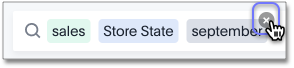
Click on the x above the filter in the search bar

You can also select the x on the filter bar above the Answer and below the Answer name.
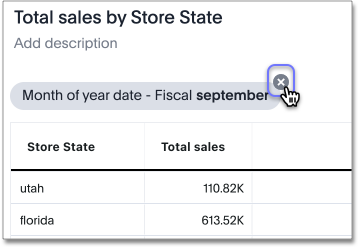
Click on the x above the filter in the filter bar

Related information

  • Add a filter to a table

  • Add a filter to a chart

  • Create a bulk filter

  • Filter on null, blank, or empty values


Was this page helpful?Give us feedback!
×

ThoughtSpot is the Modern Analytics Cloud company. Our Live Analytics services deliver personalized, actionable insights at the point of impact for every user, at every level.

Product
  • Product
  • Auto Analyze
  • Visualize
  • Connect
  • Operationalize
  • Embed
  • Mobile
  • Govern & Secure
  • New features
  • Pricing
By Role
  • Business Leader
  • Data Leader
  • Analyst
  • Product Leader
  • Developer
By Department
  • Marketing
  • Sales
  • ServiceNow Analytics
Solutions
  • Financial Services
  • Retail & E-commerce
  • Manufacturing & Logistics
  • Healthcare & Life Sciences
  • Media & Communications
  • Procurement
  • Public Sector
About Us
  • Team
  • Customers
  • Atlas Marketplace
  • Partner Directory
  • Events
  • News
  • Careers
  • Blog
  • Legal
  • Trust
Connect
  • Free Trial
  • Resources
  • Request Demo
  • Professional Services
  • Community
  • Support
  • Contact Us

(800) 508-7008

©2025 ThoughtSpot Inc. All Rights Reserved
Terms of Use Privacy Statement Cookie Policy